Geometry Dash Editor
Step into the sandbox of Geometry Dash Editor, a mode that transforms the classic rhythm-action platformer into a canvas for your imagination. Unlike the main game's fixed challenges, this editor puts the power in your hands: craft levels from scratch, place hazards, and synchronize every jump to a beat. The result is a personal twist on the genre that rewards both careful planning and bold experimentation. Whether you're replicating a favorite song's mood or inventing a gauntlet of spikes and blocks, the tools are intuitive enough for newcomers yet deep enough for veterans. Beyond individual creation, the editor thrives on sharing. Upload your levels for others to tackle, and dive into a library of user-generated content that ranges from playful romps to brutal trials. Each level you play is a glimpse into another player's style, making every session a fresh encounter. The community's output is vast, so there's always something new to try or inspire your next build. For those who love the core game's pulse but crave variety, this editor mode is a gateway to endless replayability.
 WaffleMath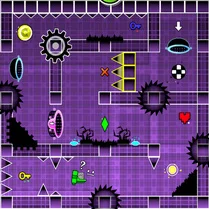
Common Core State Standards
Every game supports specific Common Core standards. Browse the full standards library.
Practice by Skill
Games by Grade
What is Geometry Dash Editor
Geometry Dash Editor invites you to craft your own rhythmic obstacle courses and test them in real-time. It's a blend of level design and platforming skill that turns every play into a personal achievement.
How to Play
Use the editor to place blocks, spikes, and other objects on a grid, then set their timing to match a track. Switch to play mode to run your level using jump controls, refining the layout until it flows perfectly.
Tips for Playing
- Start with a simple layout to learn the editor's tools before adding complex patterns.
- Sync your obstacles to the music's beat to make levels feel intuitive and satisfying.
- Playtest your level multiple times, noting where you die, and adjust difficulty gradually.
- Use decorative elements to signal upcoming hazards without cluttering the visual field.
- Look at popular community levels for layout ideas and pacing inspiration.
Frequently Asked Questions
Can I play levels made by other players?
Yes, you can browse and play a wide array of community-created levels. This gives you endless variety beyond your own creations.
Do I need to know coding to use the editor?
No, the editor is visual and drag-and-drop. You place objects and set their behavior without any programming knowledge.
Can I sync my level to my own music?
The editor lets you choose from a selection of tracks, or in some versions, import your own audio. This lets you tailor the rhythm to your design.
Is the editor mode suitable for beginners?
Absolutely. It has tutorials and simple tools, allowing newcomers to build basic levels quickly while still offering depth for advanced designers.
How do I share my levels with others?
Once you're satisfied with your level, you can upload it to the community hub, where other players can view, rate, and play it.
Related Runner Games
 Geometry Dash: Wave Editor
 Geometry Dash UFO: Create your own level
 Geometry Dash: Swing Copter Editor
 Geometry Dash: Dual Wave Editor
 Geometry Dash: Super Editor
 Geometry Dash: Waves of Motion
 Geometry Dash Zero
 Geometry Dash: Unstoppable Wave
 Geometry Dash: Wave Chaos
 Geometry Dash: Fight with Brainrot!
 Geometry Dash: Transformation!
 Geometry Dash: Make your level with a wave
 The Geometry Dash Sandbox
 Geometry Dash: Make a map with a jetpack
 Geometry Dash: Ultra Mega MOD Playground!
 Geometry Dash: Cube Farm and Other Modes!
 Geometry Dash: Make your own level with a ship
 Geometry Dash Wave: Original