Kids Coloring Book: PAW Patrol
Kids Coloring Book: PAW Patrol invites young artists to step into the colorful world of Adventure Bay and add their own creative touch to familiar faces from the popular animated series. With a variety of outlined scenes featuring the heroic pups and their vehicles, children can explore their imagination by choosing from a wide spectrum of colors and different brush sizes. The simple, intuitive interface makes it easy for kids of all ages to pick a hue and start filling in the blanks, whether they want to stay inside the lines or experiment with bold, expressive strokes. This activity is designed to be calm and screen-friendly, offering a gentle creative outlet rather than a fast-paced challenge. There are no timers, no scores, and no wrong moves—just the joy of coloring at your own pace. As each area is filled, the scene comes to life, giving a satisfying sense of accomplishment. Whether your child is a devoted fan of the show or simply loves to color, this digital coloring book provides endless opportunities for artistic play and quiet focus.
 WaffleMath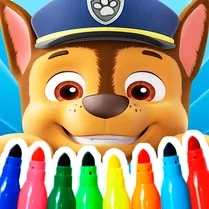
Common Core State Standards
Every game supports specific Common Core standards. Browse the full standards library.
Practice by Skill
Games by Grade
What is Kids Coloring Book: PAW Patrol
Unleash your inner artist with the heroic pups of PAW Patrol! Pick your favorite scene, choose your colors, and watch Adventure Bay come alive through your creativity.
How to Play
Select a coloring page from the available PAW Patrol scenes, then choose a color from the palette and click or tap on the areas you wish to fill. You can switch colors anytime and use different brush sizes to cover large or small sections.
Tips for Playing
- Start with larger sections using a bigger brush to fill them quickly, then switch to a smaller brush for tight spots.
- Try using colors that match the characters' real outfits for a classic look, or go wild with unique color combinations.
- If you make a mistake, look for an undo button to revert your last action instead of starting over.
- Consider filling in the background first—it can help you see which areas are still empty.
- Take your time and enjoy the process; there's no rush, so you can color as neatly or as creatively as you like.
Frequently Asked Questions
Is there a way to erase or undo a color I just applied?
Yes, most coloring games include an undo option. Look for a back arrow or eraser tool in the interface to remove your last action.
Can I save or print my finished coloring pages?
Some browser-based coloring games offer a save or print feature. Check the menu icons for options like download or print, though availability varies.
Are there multiple PAW Patrol characters to choose from?
Typically, the game includes several scenes featuring popular characters such as Chase, Marshall, Skye, and others from the series.
Is this game suitable for very young children?
Absolutely. The controls are straightforward with no complex rules, making it accessible for toddlers and preschoolers with basic mouse or touch skills.
Does the game have a time limit or scoring system?
No, this is a freeform coloring activity. There are no timers or scores, so kids can color without pressure or competition.
Can I play this on a tablet or phone?
Many browser-based coloring games are touch-friendly, so you can often play on tablets or phones by tapping the screen instead of using a mouse.
Related Art Coloring Games
 Color by number: Anime Girls
 Coloring by numbers for kids
 Among Us: Survival Coloring
 Coloring in the Animal World
 Color by number: Barbie
 Coloring book: Minecraft
 Tap To Color: Painting Book
 Brawl Stars Coloring book
 Coloring Book for Kids
 Lilo & Stitch: Coloring Book for Kids
 Italian Brainrot Coloring Book
 Color the girls 3D
 Colouring book Paw Patrol
 Unicorn Coloring
 Cartoon coloring book
 Colouring book The Fixies and Friends
 Digital Circus: Coloring Book
 Sonic Wonder Coloring