Draw and create Sprunki road
Put your imagination to work in a hand-drawn puzzle adventure where every level asks you to become an architect for a tiny creature named Sprunki. The world is full of gaps, spikes, and moving obstacles, and only your drawn lines can turn dangerous terrain into a safe journey. With a simple swipe of your finger or mouse, you create the route Sprunki will follow, turning blank space into a functional road that leads to the exit. The beauty of this game lies in its open-ended solutions—you might sketch a gentle slope, a sturdy bridge, or a cleverly angled barrier to outsmart each challenge.
 WaffleMath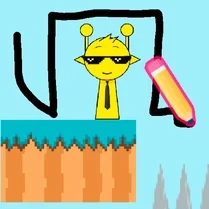
Common Core State Standards
Every game supports specific Common Core standards. Browse the full standards library.
Practice by Skill
Games by Grade
What is Draw and create Sprunki road
Draw your own paths and guide Sprunki to safety in a world where your pencil is the only tool. Every level is a fresh canvas full of obstacles waiting to be outsmarted.
How to Play
Drag on the screen to draw a line that becomes a solid road or bridge. Sprunki will automatically walk along your drawing, so make sure it leads to the exit without falling into traps.
Tips for Playing
- Start with a simple route and adjust it only after you see how Sprunki moves.
- Use longer curves for smoother turns, especially on narrow ledges.
- Double-check the height of your bridges—too low and Sprunki might bump into obstacles.
- Draw a small ramp to help Sprunki jump over gaps when the path breaks.
- If Sprunki gets stuck, erase your drawing and try a steeper or flatter angle.
Frequently Asked Questions
What happens if my drawing is too long or covers other paths?
It’s fine to use extra lines, but they might block Sprunki or confuse its movement. Clear the drawing and redraw a cleaner route if needed.
Can Sprunki jump on its own?
No, Sprunki only walks along whatever you draw. To make it climb or cross gaps, you need to create slopes or bridges yourself.
Is there a limit to how many times I can redraw a path?
You can redraw as often as you like within a level. There’s no penalty for experimenting with different routes.
Do I need to guide Sprunki with touch or can I use a mouse?
Both touch and mouse work fine. Simply press and drag on your device screen to sketch the path.
What makes a level harder as the game progresses?
Later stages add more moving hazards, tighter spaces, and taller gaps, pushing you to plan your drawing more carefully.
Can I pause the game to think about my drawing?
Yes, there’s a pause option that stops time so you can plan your route without pressure.
Related Puzzle Games
 Sprunki Schoolboy Draw the Path
 Draw Action
 Draw Road for Car
 Draw The Car Path
 Stick: Draw Road
 Draw The Ball Path
 Draw the Road for Noob!
 Draw Road for Imposters
 Draw path to home
 DOP Draw Sprunki
 Sprunki Christmas Draw the Path
 Sprunki - Draw a defense against zombies
 Sprunki - Draw a level with a friend!
 Sprunki Incredibox Draw Path
 Draw Sprunki car with physics!
 Save the Dog: Draw path to home
 ASMR Draw and Color Sprunki and Dandy's World
 Balloon Maze 2