Draw Sprunki car with physics!
This arcade game puts a sketchpad in your hands and a playground of physics challenges ahead. You're not just picking a car from a menu—you're drawing its shape, wheels, and body from scratch, then watching how your design handles loops, ramps, and bumpy terrain. Every line you draw becomes part of the vehicle's structure, and the game's motorized simulation reacts to your choices in real time. It's part puzzle, part art project, and fully about seeing if your invention can survive the course. The physics engine adds a layer of strategy that keeps things interesting. A too-long body might tip over on steep hills, while a too-narrow wheelbase could struggle with sharp turns. For a quick session or a deep dive, the game invites you to experiment, tweak, and retry until your drawn car masters each track. Whether you're a casual player who loves silly crashes or a perfectionist aiming for a flawless run, the creative freedom keeps every attempt feeling fresh.
 WaffleMath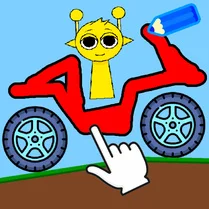
Common Core State Standards
Every game supports specific Common Core standards. Browse the full standards library.
Practice by Skill
Games by Grade
What is Draw Sprunki car with physics!
Ever wonder if your doodle can handle a loop-the-loop? This arcade physics game lets you sketch a car, then find out—with every bump and twist in between.
How to Play
Use your mouse or finger to draw the car's outline and wheels on the provided canvas, then hit the start button to launch your creation onto the track. Control the vehicle with arrow keys or touch buttons to accelerate and brake as you steer through the obstacles.
Tips for Playing
- Keep the car's center of gravity low by drawing a flatter body to prevent rollovers on steep slopes.
- Make the wheelbase slightly wider than the body for better stability during sharp turns.
- Draw larger wheels to help your car climb over obstacles and absorb landings after jumps.
- Test your design on easier tracks first to spot weak points before attempting harder challenges.
- If your car flips, try adding a small tail or adjusting the wheel positions to balance the weight.
Frequently Asked Questions
Can I really draw any shape for my car?
Yes, the game lets you draw freely, and the shape you create becomes the car's physical body. However, more complex shapes may not always perform well on the track.
How does the physics engine affect my car?
The engine simulates gravity, momentum, and collision, so your car's weight distribution and wheel placement directly influence how it drives, jumps, and lands.
Is there a way to edit my car after drawing it?
Yes, you can usually go back to the drawing screen to modify your design and then retest it on the same track, allowing for quick iterations.
What control scheme do I use to drive the car?
Typically, you use arrow keys or on-screen buttons to accelerate, brake, and sometimes tip the car for balance, depending on the course.
Are there different tracks to play on?
The game includes multiple obstacle courses with varying difficulty, from simple ramps to complex loops, to keep the challenges engaging.
Can I share my car designs with other players?
Sharing features aren't standard in the game, but you can always screenshot your design and challenge friends to recreate it yourself.
Related Racing Games
 Draw Crash Race: Stunt Race
 Draw The Hill
 Draw The Car Bridge
 Drive Mad
 Battle Wheels
 Extreme Drift
 Eggy Car
 Save My Pet
 Crash Simulator Multiplayer
 CarX Drift
 AutoNG.Destroy
 Car Crash and Destruction Simulator 3D
 Hill Climb
 French Driving
 Stunt Car Simulator 3D
 Brain It On
 Extreme Car Crash Simulator
 Car Crash: Rockfall