Racing for two
Racing for two drops you into a fast-paced lane where the only thing that matters is crossing the line before your rival. With a friend on the same keyboard or against a computer-controlled challenger, the action unfolds on a single screen split down the middle. Each track throws sharp bends, slippery sections, and moving hazards your way, forcing you to balance speed with control. The game rewards those who learn the rhythm of every course and know when to brake rather than floor it. What really sets this racer apart is the tactical layer introduced by scattered power-ups. A well-timed boost can rocket you past an opponent on a straight, while a well-aimed projectile or shield can turn a losing position into a comeback. The minimalist controls keep the focus on the duel itself, making each race feel personal and intense. Whether you're trading wins with a buddy or trying to outsmart the AI, every lap offers a fresh chance to prove who's the better driver.
 WaffleMath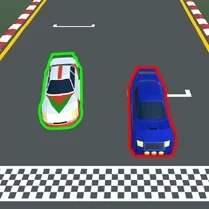
Common Core State Standards
Every game supports specific Common Core standards. Browse the full standards library.
Practice by Skill
Games by Grade
What is Racing for two
Two players, one screen, and a whole lot of rubber burning. Racing for two is a head-to-head driving duel that demands both speed and strategy.
How to Play
Use the arrow keys or WASD to steer your vehicle, and press the designated button to activate any power-up you collect. The first one to complete the required number of laps wins the match.
Tips for Playing
- Learn each track's layout by practicing alone against the AI.
- Brake early for tight corners to avoid spinning out.
- Hold onto defensive power-ups for when you're in the lead.
- Use boosts on long straights to maximize their effect.
- Watch your opponent's position on the split screen to plan your moves.
Frequently Asked Questions
Can I play alone?
Yes, you can race against an AI opponent if you don't have a second player available.
What are the system requirements?
The game runs in any modern web browser, so a standard desktop or laptop with a keyboard is all you need.
How do I control the car?
The left player uses the arrow keys, while the right player uses WASD. The space bar or a key like Enter activates power-ups, depending on which player you are.
Are there different tracks?
Yes, the game includes several circuits, each with its own unique shape and obstacles to master.
What happens if both players finish the last lap at the same time?
The game determines the winner by whose vehicle crosses the line first, even if the margin is tiny.
Is there a way to change the difficulty?
When racing against the AI, there are difficulty settings that adjust how aggressive or skilled the computer opponent is.
Related Racing Games
 Tennis Masters
 Slope 2 Players
 Get On Top
 The Squid Game: for two players
 2,3,4 Player Battles
 2 Player Games
 Botinok 2P
 Dad vs Boy. Together on split screen.
 Dangerous race for two
 Duel: Race for two
 Games For Two: Duel
 Lawn mower battle for two
 Minesweeper Duel
 Mini-game for two 2
 Racing for 2 players
 Racing Mini-Games 2 players
 Racing: Two players
 Squid Game: for two