Racing for 2 players
This is a two-player racing game that turns your keyboard into a shared cockpit. Each player controls a distinct car on the same screen, using different keys to accelerate, steer, and brake. The track is compact and filled with turns and obstacles that test reflexes and precision. It's all about crossing the finish line before your rival, making every lap a tense, head-to-head battle. Because both cars share the same screen, you can see exactly what your opponent is doing, which opens the door for strategic moves like blocking or taking a sharper line. The controls are simple enough to pick up in seconds, but mastering the tracks and outsmarting your friend provides lasting fun. Whether you're looking for a quick break or a serious rivalry, this game delivers immediate, competitive action without any complicated setup.
 WaffleMath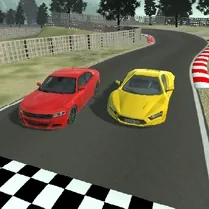
Common Core State Standards
Every game supports specific Common Core standards. Browse the full standards library.
Practice by Skill
Games by Grade
What is Racing for 2 players
Get ready for a fast-paced, two-player racing challenge where every turn matters. Compete directly against a friend on the same keyboard.
How to Play
Each player uses their assigned keys to drive their car, aiming to outpace the opponent. Navigate the track, dodge obstacles, and reach the finish line first to win.
Tips for Playing
- Master your key bindings so you can react quickly without looking down.
- Cut corners tightly to shave off precious seconds.
- Use obstacles to your advantage by forcing your rival into them.
- Anticipate your opponent's moves and block their path when possible.
- Stay calm during the final straight to avoid costly mistakes.
Frequently Asked Questions
How many players can play at once?
Exactly two players can play at the same time on a single keyboard.
What are the controls for each player?
One player typically uses the WASD keys, while the other uses the arrow keys, but you can customize them.
Can I play this game alone?
No, the game is designed specifically for two players to compete head-to-head.
Is there a way to practice my driving skills?
The best practice is to play multiple rounds and learn the track layouts to improve your timing.
What happens if both cars reach the finish line at the same time?
In most cases, the game declares a tie or awards the victory based on a precise timing system.
Can I play this game on a mobile device?
No, the game is built for desktop browsers that have a physical keyboard.
Related Racing Games
 Racing Legends: F1
 Tamaev Drive Online
 The Squid Game: for two players
 2,3,4 Player Battles
 2 Player Games
 Car Clash for Two
 Dangerous race for two
 Drive Ahead 1-2 players
 Duel: Race for two
 Super Bumper Balls
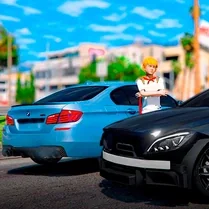 Two-Player Racing: BMW vs Mercedes Drift
 8 Ball Pool
 Agar.io
 Basketball Stars
 Krunker.io
 Rocket Soccer Derby
 Tag
Tag Tag 2
Tag 2