Hair Coloring
Hair Coloring invites you into a vibrant salon where creativity knows no bounds. With a toolkit full of brushes, sprays, and a spectrum of hues, you can transform plain strands into dazzling works of art. Whether you prefer subtle highlights, bold ombre fades, or intricate patterns, every stroke brings your vision to life. The game encourages experimentation, letting you layer colors, blend shades, and add finishing touches that reflect your personal style. There are no limits or wrong answers here—just pure artistic freedom. You can reset and start over as often as you like, making it easy to try unexpected combinations or refine your masterpiece. The intuitive interface ensures that both novices and seasoned players can jump right in and start styling. With so many options at your fingertips, each session offers a fresh chance to craft something truly original.
 WaffleMath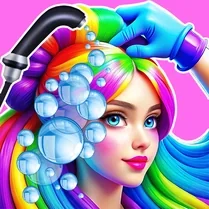
Common Core State Standards
Every game supports specific Common Core standards. Browse the full standards library.
Practice by Skill
Games by Grade
What is Hair Coloring
Step into a colorful world where hair becomes your canvas. Grab your tools and let your imagination run wild.
How to Play
Select a brush or spray tool, choose your desired color from the palette, and then click or tap on the hair to apply. You can switch tools and colors freely to build your design, and use the erase option to fix any mistakes.
Tips for Playing
- Start with a base color and then layer highlights for a natural effect.
- Use the spray tool lightly to create soft gradient transitions.
- Experiment with contrasting colors to make bold patterns stand out.
- Take advantage of the undo feature to try different approaches without worry.
- Save your favorite designs as inspiration for future creations.
Frequently Asked Questions
Can I change the hair color after I've finished?
Yes, you can go back and adjust any part of your design at any time using the eraser or by repainting over the area.
How do I create an ombre effect?
Choose a darker color for the roots and a lighter one for the ends, then blend the middle section with a shading tool to smooth the transition.
Are there preset styles to follow?
No, the game is fully open-ended, allowing you to create any style you can imagine from scratch.
Is there a way to save my work?
Yes, the game typically allows you to save your finished design to your device or share it socially.
What if I make a mistake?
Use the undo button to revert your last action, or the reset option to start over completely.
Can I adjust the brush size?
Most versions offer a size slider for the brush and spray tools, letting you add fine details or broad strokes.
Related Dress Up Style Games
 3D Acrylic Nail
 The best Mine coloring book
 Acrylic Nails
 Paint by Number
 Hair Salon
 Labubu Beauty Salon
 ASMR coloring book- Draw and Color
 Black Hole: Beauty Makeup
 Barbie Beauty Salon
 Anime Girl : Beauty Salon
 Pixel Art
 Among Us: Survival Coloring
 Face Chart - Makeup Guru
 ASMR Coloring Pages & Drawing
 Phone Case Coloring & Design - Casual DIY Game
 Puppet Designer
 Wednesday Addams Beauty Salon
 My Beauty Salon