Fashion Sticker Studio
Fashion Sticker Studio turns your screen into a digital sketchbook for style. Instead of traditional sewing or color matching, you build looks by layering illustrated stickers—from statement sunglasses to patterned sneakers—onto a model's silhouette. The game feels like a playful mood board where every drag, rotate, and resize decision changes the entire vibe of the outfit. With hundreds of pieces organized by category, you can go from minimalist chic to bold maximalist in seconds. Beyond freeform creativity, the game sets up themed styling prompts that challenge you to interpret a concept like "beach glam" or "cyberpunk brunch." There's no timer pressure; you can take your time perfecting each ensemble. Once you're happy with a creation, you can save it to your personal gallery and look back on your evolving taste. Whether you're killing a few minutes or experimenting for an hour, this studio offers a low-stakes, high-imagination space to play with fashion.
 WaffleMath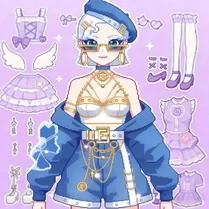
Common Core State Standards
Every game supports specific Common Core standards. Browse the full standards library.
Practice by Skill
Games by Grade
What is Fashion Sticker Studio
Craft one-of-a-kind outfits by dragging virtual stickers onto a model. It's a digital playground for anyone who loves mixing patterns, colors, and accessories without any rules.
How to Play
Select a model, then browse the sticker library and drag pieces onto the figure to build an outfit. Use the controls to rotate, scale, and layer stickers until the look feels right to you.
Tips for Playing
- Layer larger items first, like tops or dresses, so smaller accessories don't get hidden underneath.
- Rotate stickers to match the model's pose; a slight tilt can make a hat or bag look more natural.
- Mix textures—pair a glossy jacket sticker with a matte skirt sticker for contrast.
- Revisit the challenge descriptions to align your choices with the theme's mood or color hints.
- Don't be afraid to undress and start over; experimentation leads to unexpected cool combos.
Frequently Asked Questions
Can I rotate the stickers I place?
Yes, you can rotate any sticker using the rotation handle that appears after you place it. Holding the handle lets you adjust the angle precisely.
Is there a limit to how many stickers I can add?
There's no strict limit in free mode, but too many stickers can make the outfit look cluttered. Aim for balance rather than quantity.
Do the fashion challenges have time limits?
No, the styling prompts are untimed. You can spend as much time as you like perfecting your look before saving it.
Can I save my finished outfit?
Yes, the game lets you save completed looks to an in-game gallery. You can revisit them anytime and even edit them further.
Are there different body types or skin tones available?
The game offers a variety of model skins and some body shape options, giving you more diversity when creating your designs.
Does the game work on mobile devices?
Because it runs in a browser, it works on most devices, but a larger screen makes dragging and placing stickers much easier.
Related Dress Up Style Games
 Cut The Dress
 Ink Shop: Dress & Tattoo
 Toсa Boсa clothing store
 Anna's Story: Dress Up DIY
 Barbiecore
 Brainrots: Dress Up & Interior Design
 Doll Designer
 Doll Maker
 Dress Designer
 Fashion Designer Party
 Tailor Stylist: Fashion Diary
 Dress To Impress
 3D Acrylic Nail
 Beautiful Girls
 Acrylic Nails
 Beautiful Girls in Swimsuits
 Angela 2
 Fashion Dress Up for Girls