CubeCraft: Mine!
CubeCraft: Mine! drops you into a lively, block-based environment where every cube holds potential. As you chip away at the terrain, you'll gather a spectrum of colored materials, each with its own traits, from soft dirt to sturdy stone. These resources are your building blocks, literally—use them to assemble anything from cozy shelters to sprawling towers, or even rolling contraptions. The more you mine, the more you can create, turning raw extraction into a canvas for your imagination. What sets this experience apart is its gradual progression. Your trusty pickaxe is just the start; as you collect cubes, you can upgrade your tools to dig faster and tackle tougher materials. The game strikes a pleasant balance between laid-back resource gathering and satisfying construction. Whether you're a meticulous planner or a spontaneous builder, the world responds to your choices, offering a peaceful yet engaging loop that encourages experimentation. It is a relaxed sandbox where the journey from quarry to creation is always rewarding.
 WaffleMath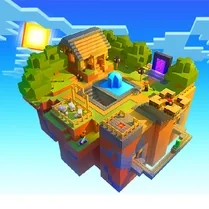
Common Core State Standards
Every game supports specific Common Core standards. Browse the full standards library.
Practice by Skill
Games by Grade
What is CubeCraft: Mine!
Explore a vibrant cube-filled landscape, gather colorful materials, and build whatever you can dream up. Upgrade your tools to reach further and create bigger.
How to Play
Use your pickaxe (click or tap the blocks) to mine cubes from the world and add them to your inventory. Select a block from your collection and place it (click or tap on the ground or existing structures) to construct your builds, while earning resources to upgrade your tools.
Tips for Playing
- Prioritize upgrading your pickaxe early to speed up mining and unlock rarer blocks.
- Plan your builds by sketching a quick layout in your head to avoid wasting materials.
- Store excess cubes in chests or organized piles to keep your inventory manageable.
- Mix different colored blocks to create visual patterns and make your structures stand out.
- Don't rush to build tall—ensure you have a steady supply of support blocks for stability.
Frequently Asked Questions
Is there a limit to how many blocks I can mine?
The world is procedurally generated, so there's always more terrain to explore and mine. Your inventory may have a cap, but you can manage it by building or storing.
Can I play with friends?
Currently, CubeCraft: Mine! is a single-player experience. Multiplayer is not available, but the creative possibilities are endless on your own.
What happens if I run out of a specific cube color?
You can simply continue mining in areas where that color is abundant. The terrain is varied, so you'll usually find what you need nearby.
Are there any dangers or enemies in the game?
No, the game focuses purely on creativity and resource gathering. There are no hostile creatures, making it a relaxing sandbox experience.
How do I upgrade my mining tools?
As you collect cubes, you'll earn in-game currency or specific materials. Use these in the upgrade menu to enhance your pickaxe's speed and efficiency.
Can I undo placing a block if I make a mistake?
Yes, you can break any block you've placed, just like natural ones. This lets you easily correct or redesign your creations.
Related Sandbox Building Games
 Mine Block: Sandbox!
 Lego constructor
 Sandbox
 3D Labubu Sandbox
 SCP sandbox online
 Sandbox 3D
 Random sandbox
 Lego Master!
 Builder
 Construction Set - 3D Builder
 Geometry MOD 5: Create a Playground map!
 Build and Destroy: Sandbox
 Sandbox: Build And Destroy 3D
 BlockWorld Sandbox - Craft simulator
 Cube World: Build and destroy
 Minecraft Editor
 Craft Flying Car
 Experiment Room: Sandbox