Crash Landing 3D
Forget smooth takeoffs and flawless flights—here, the engine is sputtering and the ground is rushing up to meet you. Crash Landing 3D drops you into the pilot's seat of a stricken plane, challenging you to guide it through a gauntlet of jagged peaks, narrow canyons, and unforgiving weather. It's less about soaring and more about surviving the inevitable impact with as much style and control as you can muster. The game thrives on the tension between desperation and skill. Each level presents a new scenario, forcing you to adjust your approach, manage what little control you have, and make split-second calls that spell the difference between a graceful skid and a fiery explosion. The physics are delightfully weighty and unpredictable, ensuring that no two crashes feel the same. Whether you're threading the needle between rock formations or trying to set down on a slope that looks anything but flat, you'll find yourself drawn back for just one more attempt at a cleaner landing.
 WaffleMath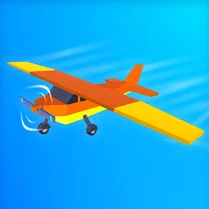
Common Core State Standards
Every game supports specific Common Core standards. Browse the full standards library.
Practice by Skill
Games by Grade
What is Crash Landing 3D
Your plane is falling apart, and the ground is anything but friendly. Crash Landing 3D is a test of your reflexes and nerve, as you wrestle with a crippled aircraft and steer it toward the least catastrophic outcome.
How to Play
Use your mouse or keyboard to tilt and adjust the aircraft's pitch and roll as it plummets. Aim for the safest spot on the terrain, manage your descent speed, and try to touch down with the wheels (or just the least damaging part) hitting the ground.
Tips for Playing
- Approach the ground at a shallow angle to avoid a nose-first disaster.
- Feather your controls gently—sharp inputs can send your plane into a spin.
- Look ahead for the flattest, most open stretch of terrain you can find.
- Use the throttle to control your rate of descent, not just your speed.
- Don't panic if you crash—the explosion is part of the fun, and you can always try again.
Frequently Asked Questions
Is there a way to land the plane perfectly?
Yes, but it's tough. A perfect landing involves touching down on the wheels with a low descent rate and minimal sideways movement, and keeping the plane intact.
What happens if I crash hard?
A hard crash results in an explosion and the level ends. You'll have to restart from the beginning of that level.
Can I play Crash Landing 3D on my phone?
The game is browser-based and designed to work with both mouse and keyboard, and it's generally playable on mobile devices through a web browser, though the controls may be less precise.
Are there multiple levels or is it endless?
The game features a series of levels, each with unique terrain and challenges. As you progress, the difficulty ramps up with more obstacles and trickier landing zones.
How do I control the plane's speed?
Speed is managed through the throttle, which you can adjust to slow down or speed up your descent. Managing speed is key to a successful landing.
Is there a scoring system?
Yes, your performance is scored based on landing accuracy, remaining health, and how cleanly you touch down. Higher scores encourage you to refine your technique.
Related Simulation Tycoon Games
 Crazy Crash Landing
 Car Crash and Destruction Simulator 3D
 Extreme Car Crash Simulator
 Car Crash: Rockfall
 Car Accident Car Crash Simulator
 Stick Dismounting!
 Stickman Destruction
 Accidents and Destruction of Cars 3D
 Airbags and Ragdoll dummies in cars
 Сar Сrash Simulator!
 Auto Wreck Simulator
 Bimka: Car Destruction and Accident Simulator
 Bimka: Car Destruction Physics 3D
 BMG Crash Test
 Car Accident and Crash Test Simulator
 Car Crash City Simulator 3D
 Car Crash Physics
 Car Crash Royale: Drive & Survive