Connect Planets - Unite Worlds
Connect Planets - Unite Worlds shifts the puzzle genre into outer space. Here, your goal is to draw lines between neighboring planets to fuse them into a single, more massive world. Each successful merge expands your cosmic territory and unlocks fresh challenges, pushing you to think several moves ahead. The game starts with simple pairings, but soon introduces obstacles, limited moves, and branching paths that demand careful planning. With a clean, minimalist aesthetic and a calming ambient soundtrack, it’s easy to lose yourself in the rhythm of connecting and combining. Whether you’re a puzzle veteran or a newcomer, the escalating difficulty keeps you engaged without ever feeling unfair.
 WaffleMath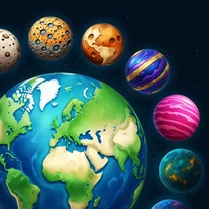
Common Core State Standards
Every game supports specific Common Core standards. Browse the full standards library.
Practice by Skill
Games by Grade
What is Connect Planets - Unite Worlds
Draw lines to link adjacent planets and merge them into grander worlds. Each connection brings you closer to uniting the entire galaxy.
How to Play
Tap or swipe from one planet to an adjacent one to draw a connection. When a link completes a merge, the two planets combine into one, and you must keep linking until the level’s goal is met.
Tips for Playing
- Plan your path before you start connecting; look ahead to avoid dead ends.
- Prioritize merging planets that are surrounded by obstacles early.
- Try to create long chains instead of isolated pairs to save moves.
- Watch for planets with special abilities that can clear blockers.
- If stuck, reset the level and try a different approach—sometimes a fresh perspective helps.
Frequently Asked Questions
What is the main objective of Connect Planets - Unite Worlds?
The goal is to merge adjacent planets by drawing lines between them until all planets are united into a specified number of larger worlds.
Are there any in-game obstacles?
Yes, later levels introduce obstacles like barriers and limited moves that require strategic planning to overcome.
How do I control the game?
You use your mouse or finger to swipe from one planet to another, creating a connection if they are adjacent.
Can I play this game on mobile devices?
Absolutely, the game is designed to work smoothly on both desktop browsers and mobile touchscreens.
Is the game suitable for beginners?
Yes, the initial levels are simple and gradually introduce new mechanics, making it accessible for all skill levels.
What happens if I run out of moves?
If you run out of moves before meeting the objective, you’ll need to restart the level and try a different strategy.