Commando Force 2
Commando Force 2 drops you behind enemy lines as a seasoned operative, where every mission demands sharp reflexes and smart positioning. Unlike mindless run-and-gun affairs, this sequel layers tactical awareness into its combat, asking you to read patrol routes, use cover, and time your strikes. The battlefield shifts between dense urban zones and open outposts, each packed with armed adversaries and explosive surprises. With a mix of side-scrolling firefights and objective-based tasks, the game keeps you on edge from the opening salvo to the final clearance. Your arsenal grows as you push forward—ranging from your standard sidearm to heavier firepower like shotguns and rifles. Between missions, you can inspect your loadout and adapt to the upcoming threats. The visual style stays crisp and readable, ensuring you can spot enemies and hazards even during chaotic exchanges. Whether you're a veteran of the genre or new to this kind of shooter, the controls are easy to pick up but the combat demands real effort to master. Every checkpoint reached feels earned, every squad eliminated brings a sense of progression.
 WaffleMath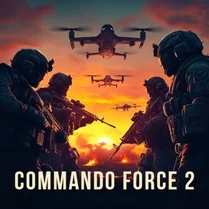
Common Core State Standards
Every game supports specific Common Core standards. Browse the full standards library.
Practice by Skill
Games by Grade
What is Commando Force 2
Grab your weapon and prepare for a relentless firefight in Commando Force 2. You'll lead a one-man war against hostile forces across a series of high-stakes missions.
How to Play
Move your character with the arrow keys or WASD and aim with the mouse, firing with the left button. Duck behind cover to avoid incoming fire, reload with R, and switch weapons using number keys or the scroll wheel.
Tips for Playing
- Always hug cover when you're not actively shooting to reduce your hit chance.
- Listen for audio cues—enemy footsteps and gunfire can warn you of flanking movements.
- Aim for headshots to take down foes faster and conserve ammo.
- Keep an eye on your ammo count; reload during lulls in combat, not in the middle of a firefight.
- Explore each area thoroughly to find hidden medkits or extra ammunition.
Frequently Asked Questions
Is Commando Force 2 a single-player game?
Yes, the game is designed for solo play, guiding you through a series of missions with set objectives.
What platforms can I play Commando Force 2 on?
It's a browser-based title, so it runs on most modern computers and laptops. Just open your web browser and jump in.
Are there different difficulty levels?
The game doesn't offer adjustable difficulty settings, but the challenge naturally increases as you advance through missions.
How do I save my progress?
Progress is typically saved after completing major milestones, though it may reset if you clear your browser's cache. Check for a save or checkpoint system in-game.
Can I use a game controller to play?
Most players use a keyboard and mouse, but the game may recognize some controllers. Check the controls menu for supported devices.
What's the best strategy for tough enemies?
Focus on using cover effectively, aim for weak points, and don't rush in—let them come to you and pick them off from a distance.
Related Shooting Games
 Shooter commandos 2
 Special Forces Sniper
 Sandstorm Covert Ops
 Call of Duty
 Masked Forces
 Army Fury: Operation Thunder
 Battlefield Teams
 CS 2: Special Forces
 Army Sniper
 Command Strike FPS
 Call of Secret Duty WWII
 Delta Force Airborne
 Assault 3D
 FPS: Modern Assault
 Agent Squad
 Overstrike 3D
 The Professional
 Combat Frontline