Command Strike FPS
Command Strike FPS drops you into a series of high-stakes firefights where quick reflexes and smart positioning are the keys to victory. As a frontline operative, you'll navigate compact, densely designed battlefields, engaging enemy squads in close-quarters and mid-range encounters. The game's crisp visual style and responsive aiming system create an immersive experience that feels right at home in any browser tab. Beyond the raw shooting, Command Strike FPS emphasizes strategic movement and resource management. You'll need to track your ammunition, use cover effectively, and decide when to push forward or hold your ground. Each match is a fresh challenge, with enemy spawns and flow keeping every session unpredictable. Whether you're a veteran of the genre or new to tactical shooters, the intuitive controls and steady learning curve ensure you can jump right into the action and start improving from your very first firefight.
 WaffleMath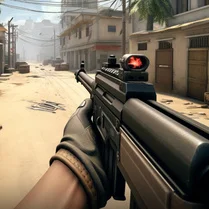
Common Core State Standards
Every game supports specific Common Core standards. Browse the full standards library.
Practice by Skill
Games by Grade
What is Command Strike FPS
Command Strike FPS is a browser-based tactical shooter that puts you in the middle of intense firefights. With its focus on precise aiming and smart positioning, it's a quick and satisfying way to get your FPS fix.
How to Play
Use the WASD keys to move, the mouse to look around, and left-click to fire your weapon. Press the R key to reload when your magazine runs dry.
Tips for Playing
- Always aim down sights for better accuracy, especially when engaging enemies at medium range.
- Keep an eye on your ammo counter and reload before you get caught in a firefight with an empty magazine.
- Use crouch to steady your aim and make yourself a smaller target in open areas.
- Listen for audio cues—footsteps and gunfire can reveal enemy positions before you see them.
- When low on health, retreat to cover and wait for your health to regenerate before re-engaging.
Frequently Asked Questions
Is Command Strike FPS free to play?
Yes, the game is free to play directly in your web browser. No purchase or subscription is required to enjoy the full experience.
Can I play Command Strike FPS on a school computer?
Because it runs entirely in the browser without downloads, it can work on many school or work networks. However, you should always follow your institution's acceptable use policies.
What are the system requirements for the game?
The game is designed to run on most modern devices with a web browser. A stable internet connection and a mouse are recommended for the best experience.
How do I aim accurately in Command Strike FPS?
Use your mouse to aim and consider right-clicking to bring up your weapon's sights. This reduces spread and helps you land shots more consistently.
Can I save my progress in the game?
The game typically doesn't require an account, so progress may be limited to each session. Check if the game offers any built-in save features or leaderboards.
Are there different weapons to unlock?
The game may offer various weapons or loadouts. As you play, keep an eye out for pickups or loadout options that give you access to different firearms.
Related Shooting Games
 Call of Secret Duty WWII
 Opration Flashpoint: Red - Blue war
 Raven 3D - Front Line
 Arena Shooter: Counter Shooter
 FPS Commando: 3D Shooter
 Sturmgrad
 Valorant Shooter
 CS 1
CS 1 Army Fury: Operation Thunder
 CS Lite
 CS 1.7
 Delta Force Airborne
 CS Remake: Modern FPS
 FPS: Modern Assault
 Global Standoff : Counter Strike
 Counter-Terror: Global Strike
 Overstrike 3D
 CS: Operation in the desert