Chess Empire 3D Board Game
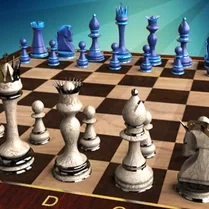
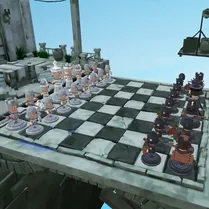
Chess Empire 3D Board Game transforms the timeless classic into a visually immersive experience where every piece feels tangible. The fully rotatable board lets you survey the battlefield from any angle, making each match feel like a dynamic tactical exercise. This fresh perspective enhances the mental challenge, requiring you to anticipate threats and opportunities that might otherwise go unnoticed in a flat, two-dimensional view. The game retains the deep strategic layers that have kept chess relevant for centuries, while the polished 3D presentation adds an inviting layer of accessibility. Whether you are a seasoned player or just beginning your chess journey, the intuitive interface and realistic piece design make setup and play effortless. Each encounter pushes you to refine your foresight and decision-making, ensuring that every session offers a satisfying blend of fun and cerebral engagement.
 WaffleMath
Common Core State Standards
Every game supports specific Common Core standards. Browse the full standards library.
Practice by Skill
Games by Grade
What is Chess Empire 3D Board Game
Dive into a captivating chess experience where the classic game meets modern 3D presentation. Enjoy a flexible, rotatable board that adds a new layer of depth to every move.
How to Play
Use your mouse or touch controls to select a piece and then tap or click a highlighted square to move it. Rotate the board freely to get a better view of the action, and aim to checkmate your opponent's king.
Tips for Playing
- Rotate the board regularly to spot hidden attack lines and escape routes.
- Control the center of the board early to give your pieces more mobility.
- Castle early to tuck your king safely behind a wall of pawns.
- Keep a close eye on your opponent's queen, as she can quickly become a major threat.
- Plan your moves a step ahead by imagining your opponent's possible responses.
Frequently Asked Questions
Does the game support multiplayer?
Chess Empire 3D Board Game is designed primarily for single-player against the computer, focusing on a solo strategic experience.
How do I rotate the board?
You can rotate the board by dragging with your mouse or using touch controls, giving you a full 360-degree view of the game.
Is there an undo move option?
Most versions of this game include an undo feature, allowing you to revert your last move and rethink your strategy.
Are there different difficulty levels?
Typically, the game offers adjustable difficulty settings, so you can challenge yourself as your skills improve.
Can I play on my mobile device?
Yes, the game is optimized for browsers and works on tablets and phones with touch controls.
What happens if I get stuck?
You can always reset the match or start a new game from the menu to try a fresh strategy.