Wood Cut 3D
Wood Cut 3D turns a simple idea into a deeply satisfying challenge: transform rough timber into precisely shaped pieces. Each level presents a clear blueprint of the target form, and your only tool is a slicing blade that can pass through the wooden block. The key is to plan each cut carefully, considering the grain, the angle, and the order of operations, because every errant slice consumes material and can ruin the final product. What sets the game apart is its tactile, almost therapeutic feel. The wood reacts with a soft resistance, and each successful cut produces a clean, satisfying split. While early levels are forgiving, the complexity ramps up quickly, introducing trickier angles, multiple cuts per block, and stricter material limits. It is a test of patience and spatial thinking, offering a calm, focused experience that rewards precision over speed.
 WaffleMath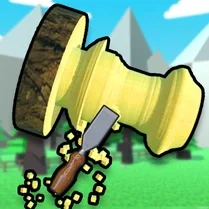
Common Core State Standards
Every game supports specific Common Core standards. Browse the full standards library.
Practice by Skill
Games by Grade
What is Wood Cut 3D
If you enjoy puzzle games that test your spatial reasoning, Wood Cut 3D offers a unique twist. It is all about carving wood with the fewest, most accurate strokes.
How to Play
Study the blueprint, then swipe or drag to draw a cutting line across the 3D block. The blade will slice along your path; aim to follow the outline as closely as possible.
Tips for Playing
- Rotate the block frequently to view it from every angle before making a cut.
- Start by removing large, obvious chunks to simplify the shape before focusing on fine details.
- Cut along the grain when possible – it often yields cleaner and more predictable results.
- If you make a mistake, restart the level rather than wasting material on a doomed attempt.
- Use the blueprint overlay to line up your cut precisely before you commit.
Frequently Asked Questions
What is the main objective of Wood Cut 3D?
The goal is to cut a 3D wooden block into a specific shape that matches the given blueprint, using as few cuts as possible and without wasting material.
How do I control the cutting blade?
You control the blade by drawing a line on the screen—swipe or drag to set the cutting path. The blade will then slice the wood along that line.
Are there any penalties for making extra cuts?
Yes, every cut that removes material that is part of the final shape is a mistake. If you cut away too much, you might fail the level. Also, using more cuts than necessary might reduce your star rating.
Can I rotate the view of the wooden block?
Absolutely. You can rotate the camera around the block to inspect it from all angles, which is essential for planning accurate cuts.
What happens if I make a wrong cut?
A wrong cut will likely remove a piece that you need, making the final shape impossible. In such cases, the level restarts or you get a failed result, so it's best to restart early.
Is there a time limit in each level?
Generally, there is no strict time limit; you can take your time to plan and execute your cuts. However, some levels may have additional challenges that require efficiency.