Wave Editor
Wave Editor turns the act of tuning an audio signal into a pulse-raising arcade run. You pilot a stylized waveform that glides along a luminous track, and every twist of its form changes both your path and the note it sings. The world reacts to your adjustments: tight squeezes demand a narrower wave while open stretches invite bold, low-frequency sweeps that layer into a live composition. What starts as a simple reflex test slowly becomes a rhythmic puzzle. Each obstacle asks you to reshape the signal mid-flight, and the music you create is the direct result of those decisions. With every level, the tempo picks up, the patterns grow trickier, and your improvised melody becomes just as important as your survival. It is a rare blend of timing, spatial awareness, and pure sonic creativity.
 WaffleMath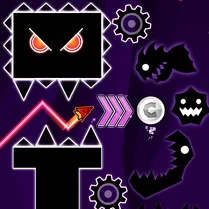
Common Core State Standards
Every game supports specific Common Core standards. Browse the full standards library.
Practice by Skill
Games by Grade
What is Wave Editor
Wave Editor blends fast-paced dodging with live music-making. Shape the wave, thread the needle, and hear your moves turn into melody.
How to Play
Use the arrow keys or on-screen controls to raise or lower the waveform’s pitch and expand or shrink its amplitude. Guide the wave through gaps in the obstacles without touching them.
Tips for Playing
- Shrink your wave early when you spot a narrow corridor—don’t wait until the last second.
- Keep an eye on the rhythm of incoming obstacles; they often sync with the beat.
- Use wide, slow adjustments for open areas to build richer musical layers.
- Memorize the pattern of longer stages so you can plan your wave shape ahead of time.
- When the tempo spikes, focus on survival first—the melody will still sound fine if you make it through.
Frequently Asked Questions
What exactly do the frequency and amplitude controls do?
Frequency changes the pitch of the note your wave plays, while amplitude changes its size. Both affect how you fit through obstacles and what sounds you create.
Can I play Wave Editor on a mobile device?
Yes, the game is designed to work with touch controls on smartphones and tablets, so you can play on the go.
Is there a way to practice a specific level?
The game includes a practice mode for levels you’ve already reached, letting you replay them without restarting from the beginning.
Do my musical choices affect the gameplay or is it just for fun?
The melody is a direct result of your wave’s shape, but it doesn’t change the obstacle layout. It’s purely an audio reward for your piloting skills.
What happens if I hit an obstacle?
Touching an obstacle ends your current run, and you’ll restart the level from the start. You can try as many times as you like.
Are there any hidden bonuses or collectibles?
Some levels hide bonus pickups that give you a score multiplier, but they’re optional and often placed in riskier spots.
Related Music Rhythm Games

 Friday Night Funkin vs Tricky
 Friday Night Funkin Indie Cross
 Music Ball Hop
 Beat Fire
 Friday Night Funkin Classic
 Friday Night Funkin': Mid-Fight Masses
 Friday Night Funkin': Sprunki
 Friday Night Funkin Mob Mod
 Friday Night Funkin': Poppy RapTime
 Amazing sprunks and music!
 Beat Blader
 Dancepool
 Friday Night Funkin' Corrupted Night
 Friday Night Funkin Halloween Pack
 Friday Night Funkin Lullaby
 Friday Night Funkin vs Ex
 Friday Night Funkin vs FNAF 1
 FridayNightFunkin vs FNAF 2