Voice Chat Online
Voice Chat Online transforms your browser into a lively social space, prioritizing spoken interaction over typed messages. Instead of navigating menus or complex controls, you simply pick a themed room that matches your mood—whether it's gaming talk, music discussion, or casual banter—and start speaking. The interface is minimal, allowing your voice to take center stage, while optional voice effects add a playful layer to your conversations. It's less about winning and more about connecting, making it a refreshing break from traditional competitive games. As you hop between rooms, you'll encounter a diverse mix of personalities from around the world. The experience feels like walking into a virtual coffee shop where every table has a different conversation waiting for you. You can stay as long as you like, move on when you're ready, or join recurring chats that feel like meeting up with old acquaintances. No account is required to dip your toes in, and the low barrier to entry means you can be talking to someone new within seconds. Whether you're a chatterbox or someone who prefers to listen first, the platform invites you to explore the social side of online gaming.
 WaffleMath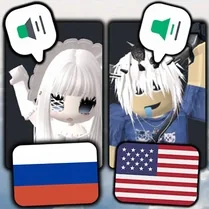
Common Core State Standards
Every game supports specific Common Core standards. Browse the full standards library.
Practice by Skill
Games by Grade
What is Voice Chat Online
Forget typing—your voice is your controller here. Jump into themed rooms and start talking with people from every corner of the globe.
How to Play
Choose a room that interests you and press the mic button to start speaking. Switch rooms anytime by clicking on new ones, and use voice effects to keep things lively.
Tips for Playing
- Pick a room topic you're genuinely curious about to spark natural conversations.
- Use voice effects sparingly—they're fun, but clarity matters for real connection.
- Start by listening for a moment to gauge the room's vibe before jumping in.
- Keep your mic muted when you're not talking to minimize background noise.
- Don't be afraid to move to a different room if the energy doesn't match you.
Frequently Asked Questions
Do I need to create an account to use Voice Chat Online?
No, you can join rooms without an account. Just grant microphone access and you're ready to talk.
Is there a way to mute other players?
Yes, you can mute individual users or turn off your own mic. Controls are simple and visible in each room.
Can I use voice effects while chatting?
Absolutely. Voice effects are available to alter how you sound, adding a fun twist to conversations.
Are the chat rooms moderated?
There's basic moderation to keep things friendly, but as in any public space, you should be mindful of your interactions.
What if I don't have a microphone?
You can still join and listen, but to speak, you'll need a mic. Most devices have one built in.
Can I switch rooms without leaving the game?
Yes, you can easily browse and jump between different themed rooms at any time, no reloads needed.