Tile Connect - Pair Matching
Tile Connect - Pair Matching takes the timeless tile-matching formula and wraps it in a crisp, clean interface that invites you to lose track of time. Each level presents a board where tiles are stacked in multiple layers, and your job is to find and link two matching pieces that sit on the same open plane. The game ramps up gently, introducing denser layouts and trickier arrangements that require careful observation before you make a move. With its calm pace and straightforward rules, it works as both a quick mental stretch and a longer, more immersive session. While the core mechanic stays familiar, the game adds a subtle layer of strategy through the order in which you clear tiles. You might think you are simply eliminating pairs, but each selection can either open up new possibilities or leave you boxed in. The board changes as you progress, so adaptability matters just as much as pattern recognition. Whether you are a casual player looking to unwind or someone craving a logical puzzle to sink your teeth into, this game meets you at your own speed.
 WaffleMath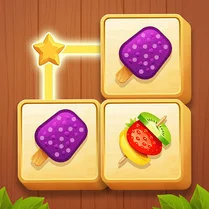
Common Core State Standards
Every game supports specific Common Core standards. Browse the full standards library.
Practice by Skill
Games by Grade
What is Tile Connect - Pair Matching
Tile Connect - Pair Matching is a deceptively simple puzzle game where you clear a board of stacked tiles by linking matching pairs. It requires quick thinking and spatial awareness to avoid getting stuck.
How to Play
Tap or click on two identical tiles that are not blocked by other tiles above or beside them to remove them from the board. Clear all tiles to complete the level.
Tips for Playing
- Always scan the entire board before making your first move to identify safe pairs.
- Prioritize removing tiles that are blocking others, even if they match a pair you see later.
- Try to clear from the edges or top layers first to expose hidden tiles underneath.
- If you are stuck, use the hint or shuffle feature (if available) to get a fresh perspective.
- Keep track of how many of each tile type remain, so you can plan your sequence.
Frequently Asked Questions
What happens when I tap on two non-matching tiles?
If the selected tiles are not a match, the game typically does nothing, and you simply need to choose a different pair. There is no penalty for wrong selections in most versions.
Why can't I match two tiles that look the same?
Each tile must be free on at least two adjacent sides (or at the edge) for it to be selectable. If a tile is blocked by others, you need to remove those first.
Can I undo a move if I make a mistake?
Many versions of this game include an undo button, but it is not guaranteed. Check the interface for an undo or back arrow icon; if not present, you can restart the level.
Is there a time limit in Tile Connect?
No, the game is not timed, so you can take as long as you need to figure out each move. However, some levels may track your score or moves.
How do I know which tiles are available to match?
Tiles that are on the top layer and have at least one open side (or are on the edge) are highlighted or appear more prominent. Once you select a tile, its available matches are usually highlighted.
What are the controls for playing on a computer?
Simply use your mouse to click on the tiles you want to match. There is no keyboard input needed; the game is fully playable with just a pointer.
Related Puzzle Games
 Tile Connect Deluxe
 Tile Connect Master: Pair Match Puzzle
 Pencil Jam
 Line Cube
 Draw One Line: Drawing Puzzle
 Link Number
 Old Bolts and Nuts
 Find and Connect
 One Line Drawing
 Connect stickers with a line
 Tasty Match - Tile Connect
 Puzzles: Collect Together
 Call Peppa Pig
 Call Shelly
 Call Wenda Sprunki right now!
 Color Route
 Doodle Boba Bubble Tea
 Draw Connect Brainrot