Steve's World
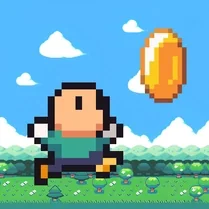
Steve's World drops you into a series of bright, blocky landscapes where every level ramps up the challenge. The game blends classic platforming with a modern, fast-paced feel—one moment you're hopping across floating platforms, the next you're dodging a line of quirky enemies. Coins are scattered everywhere, and gathering them isn't just for score; they're your ticket to unlocking new characters and adding variety to each run. What really keeps you coming back is the tight, responsive control. Steve moves with precision, letting you pull off mid-air corrections and last-second jumps that make close calls feel great. As the difficulty climbs, new obstacles and patterns appear, forcing you to learn each stage's rhythm. It's a straightforward arcade loop—jump, collect, reach the flag—but the polish and escalating pace make every attempt feel fresh and rewarding.
 WaffleMath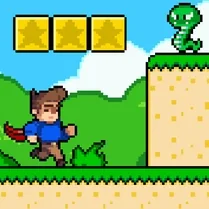
Common Core State Standards
Every game supports specific Common Core standards. Browse the full standards library.
Practice by Skill
Games by Grade
What is Steve's World
Get ready for a vibrant, fast-paced arcade adventure. Guide Steve through colorful, pixelated worlds filled with jumps, coins, and tricky enemies.
How to Play
Use the arrow keys or on-screen controls to move Steve left and right, and press the jump button to leap over gaps and enemies. Reach the flag at the end of each level while collecting as many coins as you can to unlock new characters.
Tips for Playing
- Time your jumps carefully—some platforms move, so wait for the right moment.
- Collect coins even if they're off the main path; they add up quickly for unlocks.
- Study enemy patterns before charging in, as some move in loops or sudden bursts.
- Use the pause feature to plan tricky sections if the action gets overwhelming.
- Master the double jump if available—it gives you extra room to correct mistakes.
Frequently Asked Questions
What platforms can I play Steve's World on?
Steve's World runs in any modern web browser, so you can enjoy it on desktop, tablet, or mobile without downloads.
How do I unlock new characters?
Collect a certain number of coins throughout the levels. Once you hit the required total, new characters become available from the main menu.
Is there a way to save my progress?
Yes, the game automatically saves your progress in your browser's local storage, so you can pick up where you left off next time.
What happens if I fall into a pit or touch an enemy?
You lose a life and restart the current level. The game gives you a limited number of lives, but you can earn more by collecting coins.
Are the controls customizable?
On PC, you can remap the keyboard keys in the settings menu. On touch devices, the on-screen buttons are fixed for simplicity.
Does the difficulty increase over time?
Absolutely. Each new world introduces faster enemies, trickier gaps, and more complex platform layouts, so the challenge steadily grows.
Related Obby Parkour Games

 Sprunki Retake Original
 MCParkour Noob & Noob Baby
 Obby: Steal the Fugglers Online
 Nubik is collecting a command block !
 I am Bird
 Ants Adventure
 Cartoon cat: naughty kitten
 Dandy World with a friend!
 Dino Squad Adventure
 Hello World
 Help Masha: Collect all the goodies!
 Mr. Pixel: The Path of Parkour
 Neko's Adventure
 Noobik Obbi: Platform Parkour!
 Obby: Steal a Labubu
 Pixel Hero Adventure
 Rich Robbie
 Save the Snail