Put in place: Emoji Sorting
Put in Place: Emoji Sorting turns the simple act of organizing into a lively test of quick thinking. Instead of paperwork, you're faced with a cheerful flood of tiny icons, each one needing to find its home in one of several themed containers. The challenge is to recognize each emoji's identity at a glance and move it to the correct category before the clock runs down. It's a game that exercises your brain's sorting abilities while keeping the mood light and colorful.
 WaffleMath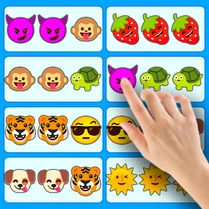
Common Core State Standards
Every game supports specific Common Core standards. Browse the full standards library.
Practice by Skill
Games by Grade
What is Put in place: Emoji Sorting
How fast can you categorize a stream of smiley faces, pizza slices, and rocket ships? Put in Place: Emoji Sorting is a cheerful puzzle that rewards quick eyes and steady hands.
How to Play
Drag each emoji that appears on your screen and drop it into the bin that matches its category, such as food, animals, emotions, or objects. Work quickly because the game gets faster and more demanding as you clear each round.
Tips for Playing
- Keep your fingers ready on the mouse or touchscreen to minimize delay between drags.
- Scan the entire row of available categories before grabbing the next emoji.
- Focus on one emoji at a time; splitting your attention slows you down.
- If you're unsure, remember that many emojis have clear visual cues like shapes or colors.
- Practice frequently to improve your reaction speed and memorization of category assignments.
Frequently Asked Questions
What happens if I drop an emoji in the wrong bin?
You'll get a penalty, usually a time deduction or a reduced score for that round, so aim carefully.
Are there different levels or difficulty settings?
Yes, the game typically increases the number of emojis and the speed of arrival as you progress, making it more challenging.
Can I play this with a keyboard?
The game is designed for mouse or touch input, as dragging is essential, but some versions may offer keyboard shortcuts.
Is there a way to pause the game?
Most versions allow you to pause or take a break between rounds, but not during an active round.
Does the game work on mobile devices?
Yes, the touch-based controls make it easy to play on phones and tablets.
Related Puzzle Games

 Water Color Sort
 Wool Art Sort Puzzle 3D
 Nut Sort: Color Puzzle Game
 ASMR: Cut and sort blocks
 Goods sort: Perfect Shelf
 Screw Sort 3D
 Fridge: perfect stocking
 AquaSort
 Hexa Sort
 Sorting: Buses and Passengers
 Thread Sort Puzzle 3D
 Bead Sort 3D
 Your Hogwarts House
 Nuts Color Sort Puzzle
 Coin Sort
 Liquid Sort
 Ball Sort Puzzle
 Color Hexa Sort