Pilot Flight Simulator 3D
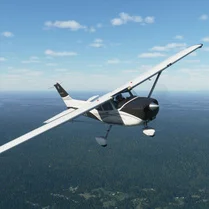
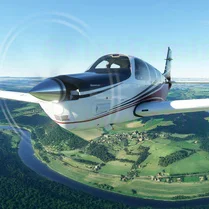
Pilot Flight Simulator 3D drops you into the cockpit of a range of aircraft, from nimble prop planes to faster jets, all rendered in a clean 3D world. The game strikes a balance between accessibility and depth: you can pick up the basics in minutes, but mastering crosswind landings, fuel management, and tight approach paths takes practice. Whether you're ferrying passengers between islands or chasing down a target, every flight feels distinct thanks to changing weather and varied terrain. Beyond the core missions, the game gives you freedom to explore an open sky at your own pace. You can test your skills in free-flight mode, experimenting with loops and stalls, or try to beat your best landing scores. The arcade-style controls keep things responsive, while the physics add just enough realism to make each touchdown satisfying. With multiple airports to discover and a steady progression of challenges, this is a flying experience that rewards patience and sharp reflexes.
 WaffleMath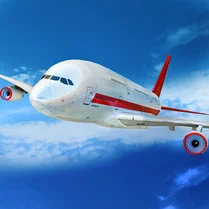
Common Core State Standards
Every game supports specific Common Core standards. Browse the full standards library.
Practice by Skill
Games by Grade
What is Pilot Flight Simulator 3D
Ready for a flight challenge that's easy to start but hard to master? Grab the yoke and take off into a world of aerial missions and scenic routes.
How to Play
Use the on-screen controls or your keyboard to adjust throttle, pitch, and roll. Follow the mission markers, manage your speed, and line up with the runway to land safely.
Tips for Playing
- Keep your approach speed steady and slightly reduce throttle as you near the runway for a smoother touchdown.
- When flying in bad weather, rely on your instruments and make small corrections rather than jerky inputs.
- Complete earlier missions to unlock new aircraft with different handling characteristics.
- Don't rush turns near mountains—bank gently and maintain altitude to avoid stalls.
- Use the camera views to check your landing gear and alignment before touching down.
Frequently Asked Questions
What platforms can I play this on?
It's a browser-based game, so you can play it on most devices with a modern web browser and internet connection.
How do I control the aircraft?
You can use the keyboard arrow keys or mouse controls, depending on your preference. The game also provides on-screen buttons for touch devices.
Are there different types of vehicles?
Yes, the game includes several aircraft models, each with unique speed, agility, and durability traits.
Can I play without an internet connection?
No, this is an online game that requires a live connection to France the server and load flight data.
Is there a free-flight mode?
Yes, you can choose a free-flight mode to explore the map without mission objectives, perfect for practicing your piloting skills.
What happens if I crash or fail a mission?
You'll be able to retry the mission from the start, and your progress on that challenge resets, but your overall unlocks remain.