Goods Sorting:Puzzle Challenge
Goods Sorting: Puzzle Challenge is a brain-teasing game that blends quick thinking with precise actions. You're faced with a variety of objects—ranging from fresh produce to hardware tools—that must be placed into their designated color-coded bins. As you advance, the pace picks up and the variety of items expands, keeping your mind sharp and your hands busy. Each level is a fresh test of your ability to categorize under time constraints. The satisfaction comes from plotting your moves efficiently and watching the clutter disappear into orderly groups. With its escalating difficulty and simple-to-understand mechanics, this game offers a rewarding experience for anyone who loves a good mental workout.
 WaffleMath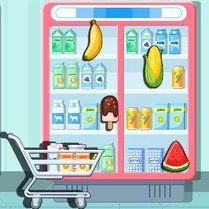
Common Core State Standards
Every game supports specific Common Core standards. Browse the full standards library.
Practice by Skill
Games by Grade
What is Goods Sorting:Puzzle Challenge
A puzzle where every second counts as you match objects to the right spots. Can you keep up with the growing chaos?
How to Play
Drag each item and release it over the container that matches its color. Complete the level by sorting all items before the timer hits zero.
Tips for Playing
- Scan the entire shelf before moving your first item to plan ahead.
- Prioritize items whose matching bin is already partially filled.
- Use quick, deliberate mouse movements to avoid dropping items in wrong places.
- If you're stuck, focus on one color at a time to reduce visual clutter.
- Keep an eye on the timer; slower sorting is okay early on but speed up later levels.
Frequently Asked Questions
What happens if I place an item in the wrong bin?
The item will bounce back, and you'll lose a small amount of time. Try to be accurate to avoid penalties.
Are there different levels of difficulty?
Yes, the game gradually introduces more item types and shortens the time limit as you progress.
Can I pause the game?
Most versions allow you to pause by clicking the pause button, which stops the timer until you resume.
Is there a way to get extra time?
Some levels may include bonus clocks or items that add a few seconds. Keep an eye out for them.
What devices can I play on?
The game is designed to run on desktop browsers with mouse controls, but some versions may support touch devices.
How do I know which bin an item belongs to?
Each item has a colored outline or label that matches the bin. Match them to sort correctly.
Related Match Bubble Games
 Nut Sort: Color Puzzle Game
 Thread Sort Puzzle 3D
 Bead Sort 3D
 Coin Sort
 Color Hexa Sort
 Balls in flasks: Sorting
 Sort It - Water Sort Puzzle
 Sort Tiles Puzzle
 Sort Colored Balls Puzzle
 Sort and pour
 Water Drop Sort
 Soda sort
 Sorting: Colored blocks
 Color Ball Sort: Online Puzzle Game
 BBQ Sort Puzzle
 Coffee Sort Puzzle
 Cup Sort Puzzle 3D
 Sorting Water Colors