Chibi Dress Up & Coloring
Chibi Dress Up & Coloring invites you into a playful world of miniature characters with big heads and tiny bodies, just waiting for your fashion sense. Start by picking a chibi base, then layer on tops, bottoms, dresses, shoes, and accessories to create a look that's all yours. The options are varied enough to experiment with everything from sporty to princess-like styles. Once your outfit is together, the coloring side kicks in. You can use a palette of shades to fill in clothing sections, add stripes, dots, or even custom doodles. The combination of outfit selection and coloring gives you total control over every detail, turning each character into a small canvas for your imagination. Whether you prefer pastel tones or bold contrasts, the tools are easy to use and quick to master.
 WaffleMath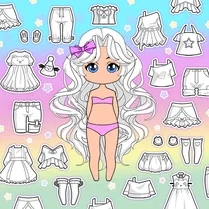
Common Core State Standards
Every game supports specific Common Core standards. Browse the full standards library.
Practice by Skill
Games by Grade
What is Chibi Dress Up & Coloring
A creative mix of dress-up and coloring, this game lets you style chibi characters from head to toe. Add your own paint touches to make each look stand out.
How to Play
Choose a chibi character, then browse through clothing and accessory tabs to dress them up. After that, pick a coloring tool and tap or click on outfit areas to apply your custom colors and patterns.
Tips for Playing
- Try layering different clothing items to see how they interact before coloring.
- Use the undo button if you make a coloring mistake—it's your best friend.
- Contrast your outfit colors with the chibi's hair and skin for a balanced look.
- Create a theme (like beach or party) and stick to it for a cohesive design.
- Experiment with the brush size to add tiny details or cover large sections quickly.
Frequently Asked Questions
Can I save my finished chibi design?
Yes, most versions of the game allow you to take a screenshot or export your creation. Check for a camera or save icon in the interface.
Are there many clothing items to choose from?
The game includes a good variety of tops, bottoms, dresses, shoes, and accessories, so you can mix and match to your heart's content.
Can I change the chibi's skin or hair color?
Yes, you can typically customize skin tone and hair color before or during dress-up. Look for a palette icon near the character.
Is this game suitable for kids?
Absolutely. The controls are simple, the content is family-friendly, and it encourages creativity without any complex mechanics.
How do I color a specific part of the outfit?
Select an outfit piece that is already on the chibi, then pick a color from the palette and tap the matching area on the character. Some pieces have multiple sections to color separately.
Can I erase or redo my coloring?
Yes, there is usually an eraser tool and an undo button to help you fix mistakes or start over on a particular section.
Related Dress Up Style Games
 Gacha Club
 Gacha Life 3
 New Anime Girl
 Anime Avatar Maker: Anime Doll
 Color by number: Anime Girls
 Anime Girl : Beauty Salon
 Gacha life 3D
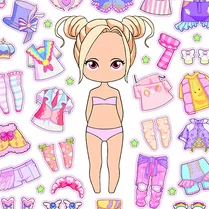 Chibi Dolls
 Furry Girls
 Anime: Paint by Numbers
 Gacha life maker
 Gacha Life: Love
 Anime Couple: Avatar Maker
 Color the girls 3D
 Live Avatar Maker: Girls
 Gacha Life: Find Your Love!
 Anime Couples Dress Up
 Anime Doll - DIY Cosplay Girl